

Compliance That Fits Microsoft Dynamics 365 Commerce Users
How Microsoft Dynamics 365 Commerce Supports Luxembourg Invoice Processing
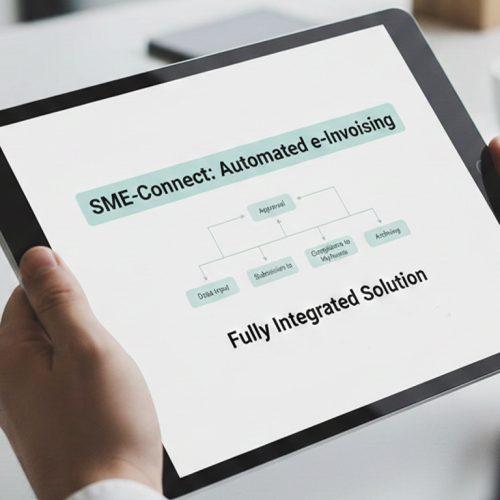
- Transaction Capture: Sales, order, customer, product, and relevant tax information is gathered from Microsoft Dynamics 365 Commerce.
- Invoice Preparation: Transaction details are organized into invoice-ready information while preserving the relationship with the originating sales activity.
- Information Review: Relevant fields are checked for completeness and consistency before the electronic document is prepared.
- Structured Document Creation: Applicable information is arranged into a structured electronic invoice format suitable for the relevant Luxembourg workflow.
- Electronic Transmission: Applicable invoices can follow the appropriate electronic transmission route for qualifying Luxembourg transactions.
- Activity Recording: Processing information can remain associated with the underlying Commerce transaction for continued business and invoice reference.
What Advintek Adds to Microsoft Dynamics 365 Commerce
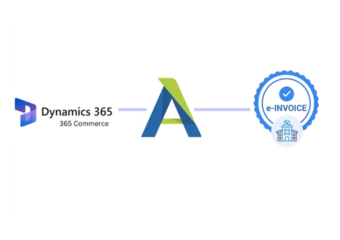
Microsoft Dynamics 365 Commerce manages retail, order, customer, and transaction information, while Advintek adds an electronic invoicing layer for applicable Luxembourg processes. This helps organize relevant data for structured invoice preparation and suitable transmission while maintaining the context of originating Commerce transactions.
- Organizes Commerce transaction information for invoicing
- Reviews invoice fields before document processing
- Supports applicable electronic transmission workflows
- Maintains links with originating transaction records
Operational Improvements for Microsoft Dynamics 365 Commerce
- Better Retail Invoice Organization — Sales and order information can be arranged systematically before entering the electronic invoice workflow.
- More Accurate Customer Association — Recipient information can stay connected with the relevant transaction and resulting invoice.
- Clearer Tax Information Handling — Applicable tax details can be reviewed alongside transaction information before electronic document preparation.
- Improved Order-to-Invoice Continuity — Product and order details can remain associated with the corresponding invoice throughout processing.
- Earlier Data Issue Detection — Missing or inconsistent invoice information can be identified before documents advance through subsequent workflow stages.
- Simpler Transaction Review — Teams can refer to invoice activity alongside originating Commerce records when checking individual transactions.
Complete Control Over Luxembourg E-Invoicing Workflows in One Platform
Error Detection and Resolution Support
Relevant sales and invoice information can be reviewed before documents enter the applicable electronic processing route.
Dashboard and Reporting
Invoice activity can be monitored to identify documents requiring additional attention during electronic processing.
Dedicated e-Invoicing Support
Processed invoice information can remain associated with relevant Commerce transactions for operational reference.
Luxembourg Requirements Within Microsoft Dynamics 365 Commerce
For applicable Luxembourg public procurement and concession transactions, electronic invoices can be exchanged through the Peppol network. Permitted alternative procedures may also be available through MyGuichet.lu, depending on the applicable transaction and recipient requirements.
- Supports structured invoices for applicable transactions
- Organizes data around Luxembourg requirements
- Supports applicable Peppol transmission workflows
- Accommodates permitted MyGuichet.lu procedures
For Smooth Luxembourg Invoicing
Give your Commerce workflows a clearer route for applicable electronic invoicing.
Advintek supports Dynamics 365 Commerce Luxembourg invoicing workflows.
Ready e-Invoice System
Frequently Asked Questions Microsoft Dynamics e-Invoicing Luxembourg
How can retail transactions become invoice-ready for Luxembourg processing?
Relevant sales, order, customer, product, and tax information from Microsoft Dynamics 365 Commerce can be organized into invoice-ready data. This preparation keeps commercial details connected with the original retail transaction, helping ensure the resulting invoice contains the necessary information for accurate Luxembourg processing and review.
Can customer information from Commerce remain associated with invoices?
Yes. Relevant customer and recipient information from Microsoft Dynamics 365 Commerce can remain associated with the corresponding transaction and invoice during processing. This helps preserve customer context when teams review invoice documents, verify recipient details, or investigate individual retail transactions requiring additional attention or correction before exchange.
How are product and order details treated during e-invoice preparation?
Product, order, service, and transaction information can be organized alongside applicable invoice fields during document preparation. This approach keeps important commercial details available when creating structured invoice documents, while helping teams maintain consistency between the original Commerce activity and the information included in the resulting invoice.
Can invoice exceptions be identified before electronic transmission?
Processing can include checks for incomplete, inconsistent, or missing information before an invoice progresses toward its applicable transmission route. This gives teams an opportunity to review relevant transaction details, address data issues, and make necessary corrections before the document continues through Luxembourg invoice processing and exchange workflows.
How can Commerce teams review electronic invoice activity?
Invoice activity can remain associated with underlying Microsoft Dynamics 365 Commerce transactions, allowing teams to review document progress and processing outcomes with the original sales context available. This connection can help users understand invoice status, investigate processing issues, and reference related transaction information when reviewing completed or pending documents.